
Analyzing your prompt, please hold on...
An error occurred while retrieving the results. Please refresh the page and try again.
This documentation explains how to customize the appearance of barcodes using the Aspose.BarCode Cloud SDK for .NET. It provides details on the available methods, customization options, and examples of usage.
When generating a barcode, you can customize various aspects of its appearance using the properties of the request classes.
Key Properties:
QR, Aztec, Pdf417, Code39, etc).Png, Jpeg, Svg).AliceBlue or #FF000000).Below, Above, None).Pixel, Inch, Millimeter).In addition to the common appearance settings above, the API exposes advanced parameters that apply only to specific barcode types. They are ignored when a different barcode type is generated.
Auto, Extended, Binary, ECI).LevelL, LevelM, LevelQ, LevelH).Auto, Version01–Version40). Auto selects the smallest version that fits the data.UTF8, ISO_8859_1).0 to 1.Auto, M1–M4). Used when the barcode type is MicroQR.Auto, R7x43–R17x139). Used when the barcode type is RectMicroQR.Auto, CodeA, CodeB, CodeAB, CodeC, CodeAC, CodeBC).Auto, Binary, ECI, Extended).Level0–Level8).1–30, or 0 for auto).3–90, or 0 for automatic).2–5 for MicroPDF417; 3–5 for PDF417 and MacroPDF417).None, Macro05, Macro06).using Aspose.BarCode.Cloud.Sdk.Api;
using Aspose.BarCode.Cloud.Sdk.Interfaces;
using Aspose.BarCode.Cloud.Sdk.Model;
using System;
using System.IO;
using System.Reflection;
using System.Threading.Tasks;
namespace GenerateSnippets;
internal static class Program
{
private static Configuration MakeConfiguration()
{
var config = new Configuration();
string? envToken = Environment.GetEnvironmentVariable("TEST_CONFIGURATION_ACCESS_TOKEN");
if (string.IsNullOrEmpty(envToken))
{
config.ClientId = "Client Id from https://dashboard.aspose.cloud/applications";
config.ClientSecret = "Client Secret from https://dashboard.aspose.cloud/applications";
}
else
{
config.JwtToken = envToken;
}
return config;
}
public static async Task Main(string[] args)
{
string fileName = Path.GetFullPath(Path.Join("Tests", "test_data",
"qr.png"
));
GenerateApi generateApi = new GenerateApi(MakeConfiguration());
var generated = await generateApi.GenerateAsync(barcodeType: EncodeBarcodeType.QR,
data: "Aspose.BarCode.Cloud",
barcodeImageParams: new BarcodeImageParams
{
ImageFormat = BarcodeImageFormat.Png,
ForegroundColor = "Black",
BackgroundColor = "White",
TextLocation = CodeLocation.Below,
Resolution = 300,
ImageHeight = 200,
ImageWidth = 200
},
qrParams: new QrParams
{
QrEncodeMode = QREncodeMode.Auto,
QrErrorLevel = QRErrorLevel.LevelM,
QrVersion = QRVersion.Auto,
QrAspectRatio = 0.75f
});
await using FileStream stream = File.Create(fileName);
await generated.CopyToAsync(stream);
Console.WriteLine($"File '{fileName}' generated.");
}
}
Result Image is: 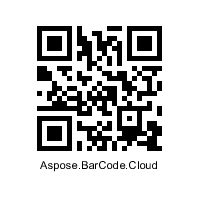
using Aspose.BarCode.Cloud.Sdk.Api;
using Aspose.BarCode.Cloud.Sdk.Interfaces;
using Aspose.BarCode.Cloud.Sdk.Model;

using System;
using System.IO;
using System.Reflection;
using System.Threading.Tasks;

namespace GenerateSnippets;

internal static class Program
{
    private static Configuration MakeConfiguration()
    {
        var config = new Configuration();

        string? envToken = Environment.GetEnvironmentVariable("TEST_CONFIGURATION_ACCESS_TOKEN");
        if (string.IsNullOrEmpty(envToken))
        {
            config.ClientId = "Client Id from https://dashboard.aspose.cloud/applications";
            config.ClientSecret = "Client Secret from https://dashboard.aspose.cloud/applications";
        }
        else
        {
            config.JwtToken = envToken;
        }

        return config;
    }

    public static async Task Main(string[] args)
    {
        string fileName = Path.GetFullPath(Path.Join("Tests", "test_data",
            "QrCustom.jpeg"
        ));

        GenerateApi generateApi = new GenerateApi(MakeConfiguration());

        var generateParams = new GenerateParams
        {
            BarcodeType = EncodeBarcodeType.QR,
            EncodeData = new EncodeData { Data = "Aspose", DataType = EncodeDataType.StringData },
            BarcodeImageParams = new BarcodeImageParams
            {
                ForegroundColor = "#FF0000",
                BackgroundColor = "#FFFF00",
                ImageFormat = BarcodeImageFormat.Jpeg,
                RotationAngle = 90
            },
            QrParams = new QrParams
            {
                QrEncodeMode = QREncodeMode.Auto,
                QrErrorLevel = QRErrorLevel.LevelM,
                QrVersion = QRVersion.Auto,
                QrAspectRatio = 0.75f
            }
        };

        var generated = await generateApi.GenerateBodyAsync(generateParams);

        await using FileStream stream = File.Create(fileName);
        await generated.CopyToAsync(stream);

        Console.WriteLine($"File '{fileName}' generated.");
    }
}
Result Image is: 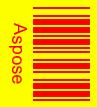
using Aspose.BarCode.Cloud.Sdk.Api;
using Aspose.BarCode.Cloud.Sdk.Interfaces;
using Aspose.BarCode.Cloud.Sdk.Model;

using System;
using System.IO;
using System.Reflection;
using System.Threading.Tasks;

namespace GenerateSnippets;

internal static class Program
{
    private static Configuration MakeConfiguration()
    {
        var config = new Configuration();

        string? envToken = Environment.GetEnvironmentVariable("TEST_CONFIGURATION_ACCESS_TOKEN");
        if (string.IsNullOrEmpty(envToken))
        {
            config.ClientId = "Client Id from https://dashboard.aspose.cloud/applications";
            config.ClientSecret = "Client Secret from https://dashboard.aspose.cloud/applications";
        }
        else
        {
            config.JwtToken = envToken;
        }

        return config;
    }

    public static async Task Main(string[] args)
    {
        string fileName = Path.GetFullPath(Path.Join("Tests", "test_data",
            "Pdf417.svg"
        ));

        GenerateApi generateApi = new GenerateApi(MakeConfiguration());

        var generated = await generateApi.GenerateMultipartAsync(barcodeType: EncodeBarcodeType.Pdf417,
            data: "Aspose.BarCode.Cloud",
            barcodeImageParams: new BarcodeImageParams
            {
                TextLocation = CodeLocation.Above,
                ImageFormat = BarcodeImageFormat.Svg
            },
            pdf417Params: new Pdf417Params
            {
                Pdf417EncodeMode = Pdf417EncodeMode.Auto,
                Pdf417ErrorLevel = Pdf417ErrorLevel.Level2,
                Pdf417AspectRatio = 3
            });

        await using FileStream stream = File.Create(fileName);
        await generated.CopyToAsync(stream);

        Console.WriteLine($"File '{fileName}' generated.");
    }
}
Result Image is: 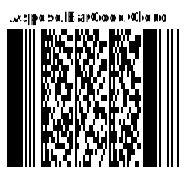
Analyzing your prompt, please hold on...
An error occurred while retrieving the results. Please refresh the page and try again.